Fix the claw hands on the next reroll, not the tenth
For anyone generating AI images, Reroll Rescue Studio turns your plain-English complaint into a rewritten positive prompt plus a lean, model-tuned negative prompt — so you stop burning credits salvaging one good image.
30-day money-back guarantee · runs on your own image generator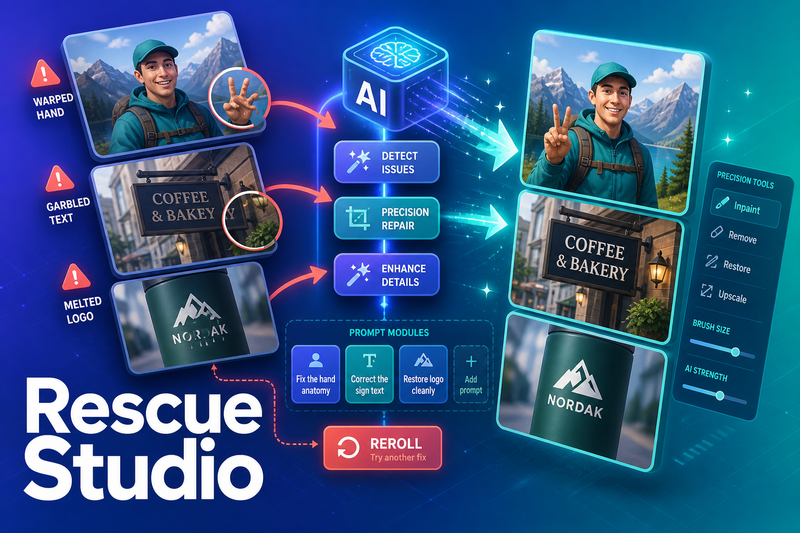
Built for makers who are done rerolling blind
Made for solopreneurs, e-commerce sellers, course creators, and small creative teams who generate their own AI images every week.
Customer or platform logos appear here.
You already know how this goes
You typed the prompt. The lighting is right, the pose is right, the whole frame is right — except the hands have six fingers, the sign text is alien gibberish, or the logo melted into soup.
So you reroll. Same prompt, new seed. Broken again. You reroll again. And again. Ten generations deep, credits gone, patience gone, and you're still trying to rescue the one image that was almost perfect.
Here's the part nobody tells you: the fix was never the seed. It lives in the positive and negative prompt. But writing the right corrective terms for your exact defect on your exact model is fiddly, undocumented tribal knowledge scattered across forum threads you don't have time to read.
Describe it out loud. Get the fix in seconds.
Describe what's wrong the way you'd say it — "the hands are claws," "the text is gibberish," "the logo melted." Paste your original prompt. Pick your model. In seconds you get a corrective prompt pair engineered for that exact flaw.
-
Rewritten positive prompt
Keeps your creative intent and adds the phrasing that pre-empts the flaw before it happens.
-
Lean, model-tuned negative prompt
Built to kill that exact defect — not a 200-word dump the generator quietly ignores.
-
Reroll checklist
Tells you precisely what to change before you hit generate — so you reroll with intent, not hope.
Everything the app puts to work on your bad image
Defect-to-fix diagnosis from plain English
Describe the problem in your own words and get corrective prompt terms back. No prompt-engineering jargon required.
A rewritten positive prompt
Your original vision stays intact, now with the phrasing that heads off the flaw before it happens.
A lean, model-tuned negative prompt
Targeted terms the model actually respects, so you spend words where they count instead of padding a negative dump.
Model presets for Midjourney, Flux, SD & Z-Image-class
Output matches how each model reads prompts — because a Midjourney fix and an SD fix aren't the same fix.
A common-failure library
Ready-made knowledge for the defects that break most images: hands, text, logos, and anatomy.
One-click copy on both prompt fields
Grab the positive and negative prompt and paste them straight into your generator.
Save and reuse winning fix recipes
When a correction works, keep it and reapply it the next time the same defect shows up.
Every blind reroll is money and an afternoon you don't get back
You're generating more AI images than ever — product shots, ad creative, course thumbnails, client work — and image credits aren't free.
The models keep changing too. A negative prompt that worked in Stable Diffusion falls flat in Flux or a Z-Image-class model. Chasing that moving target by hand, thread by thread, is a losing game. Reroll Rescue Studio keeps the corrective knowledge in one place, tuned per model, so you fix flaws instead of researching them.
Three steps between a broken image and a clean one
-
1
Describe the defect
Type what's wrong in plain English — "claw hands," "melted logo," "gibberish sign text."
-
2
Paste your prompt & pick your model
Drop in the original prompt and select Midjourney, Flux, Stable Diffusion, or a Z-Image-class model.
-
3
Copy the fix and reroll
Get a rewritten positive prompt, a lean negative prompt, and a checklist. One click to copy, paste, and reroll with the flaw already accounted for.
What runs between two very different afternoons
You open your generator with a prompt that's almost there. You reroll on the same seed logic, watch the same broken hands come back, and grind through ten generations trying to rescue one frame. By the time you get something usable, the credits are spent and the afternoon is gone.
You paste the defect, paste the prompt, pick the model. Seconds later you've got a corrective prompt pair engineered for that exact flaw. You reroll with the fix baked in and move to the next image instead of the next attempt — and the winning recipe is saved for next time.
Describe the flaw, get the fix prompt. That's the whole workflow.
Real feedback, front and center
Customer testimonials appear here.
If you generate your own images, this is for you
Solopreneurs
Generating their own AI images who can't afford to burn a morning on rerolls.
E-commerce sellers
Producing product shots where a melted logo or warped detail kills the listing.
Course creators & marketers
Who need clean thumbnails and illustrations on a schedule.
Small agencies
Producing client creative where "the hands look wrong" isn't an acceptable deliverable.
Ad buyers
Testing AI-generated creatives at volume, where every wasted generation is wasted budget.
Where it won't help
If you don't generate your own AI images, there's nothing to fix. And it won't hand you a guaranteed perfect image in a fixed number of tries — it writes sharper corrective prompts and cuts wasted rerolls; it doesn't control your generator's output for you.
One price. Pay once. Use it as long as you like.
Reroll Rescue Studio is $22, one-time — less than a single wasted afternoon of rerolls, and well under the $10–50/month image tools you already tolerate.
Starter — the app
$22 one-time
- Defect-to-fix diagnosis from plain English
- Positive + negative prompt pair, every time
- Model presets: Midjourney, Flux, SD, Z-Image
- Common-failure library + save fix recipes
Runs on your own image generator and LLM provider key.
Ready for more? Optional one-time upgrades scale with you.
| What's included | Starter$22 | Pro$39 | Agency$79 | Done-for-you$149 |
|---|---|---|---|---|
| Defect-to-fix diagnosis | Yes | Yes | Yes | Yes |
| Positive + negative prompt pair | Yes | Yes | Yes | Yes |
| Model presets (MJ, Flux, SD, Z-Image) | Yes | Yes | Yes | Yes |
| Common-failure library | Yes | Yes | Yes | Yes |
| Save fix recipes | Included | Unlimited | Unlimited | Unlimited |
| Batch reroll-fixing across images | — | Yes | Yes | Yes |
| Client-use rights + multi-seat | — | — | Yes | Yes |
| Done-for-you failure-library packs | — | — | Yes | Yes |
| Monthly new-model preset drops | — | — | — | Yes |
30-day money-back guarantee
Try Reroll Rescue Studio for 30 days. If it doesn't give you sharper corrective prompts and fewer wasted rerolls, email {{support_email}} and get a full refund. No forms, no questions.
The questions makers ask before their first fix
How do I get started?
Enter the app, drop in a bad-image complaint and your original prompt, pick your model, and copy the corrective prompt pair. You'll have your first fix in about 5 minutes.
Do I need my own API key?
Yes. Reroll Rescue Studio runs on your own image generator and LLM provider key (Anthropic by default, with an OpenAI shim available). Add your key in the .env file and you're live — the diagnosis is fully wired, there's just no shared key to piggyback on. Costs are the standard per-use rates from your provider.
Does it work with my model?
It ships with presets for Midjourney, Flux, Stable Diffusion, and Z-Image-class models, and tunes the output to how each one reads prompts.
Will it guarantee a perfect image?
No — and any tool that promises that is lying. It writes sharper corrective prompts targeted at your exact defect so far fewer generations get wasted. You still run your own generator.
Is my data private?
Your keys stay in your own environment and your prompts are sent only to the provider you configure. Nothing is routed through a shared server you don't control.
How do I get support?
Email {{support_email}} and we aim to reply within 24–48 hours. The quick-start docs cover setup as your first stop.
Is there a subscription?
The core app is a one-time $22 purchase — use it as long as you like. Optional upgrades (Pro, Agency, Done-for-you) are available if you want more, and only the Done-for-you tier is a recurring monthly drop.
Stop rerolling blind
The flaw was never the seed. Describe what's wrong, get the fix prompt, and reroll with the correction already in place — starting today.
Show me the fix prompt30-day money-back guarantee. If it doesn't cut your wasted rerolls, email {{support_email}} — no questions.